How to Combine Videos on iPhone Without an App
This is YOU?
Trying to use built-in iPhone features but they're limited or don't work well.
Can't combine videos from different recordings easily.
iPhone's native video editing is basic and doesn't sync multiple videos.
Google searches show "how to combine videos on iPhone without an app" but solutions are limited.
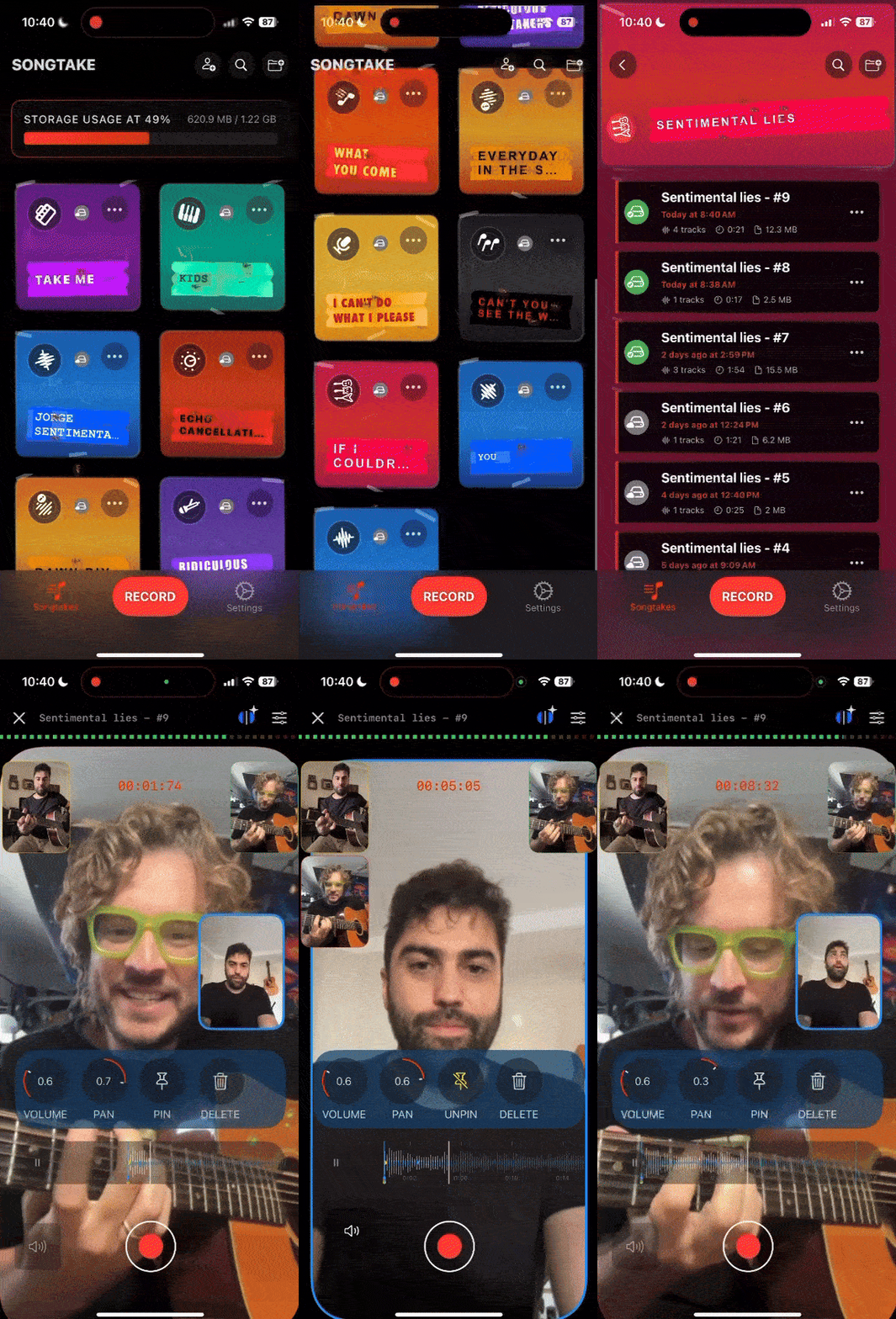
Wskazówka Pro: TIP: While iPhone's built-in video editing can combine clips, it doesn't sync multiple videos from different devices. SONGTAKE combines videos from multiple iPhones automatically synced—better than basic iPhone editing, and you can export to Camera Roll when done.
Często Zadawane Pytania
How do I combine videos on iPhone without an app?
iPhone's Photos app can combine videos using basic editing, but it's limited to clips from the same device. For combining multiple videos from different iPhones with automatic sync, SONGTAKE is the best solution—it combines videos automatically synced and you can export to Camera Roll when done, so it works with iPhone's built-in Photos app.
Can I use iPhone's built-in features to combine videos?
Yes, iPhone's Photos app has basic video editing that can combine clips, but it doesn't sync multiple videos from different devices automatically. SONGTAKE combines videos from multiple iPhones with perfect sync, then you can export to Camera Roll—best of both worlds.
Do I need to download an app to combine videos?
For basic combining of clips from the same device, iPhone's Photos app works. But for combining multiple videos from different iPhones with automatic sync, SONGTAKE is the solution—and you can export to Camera Roll so it integrates with iPhone's native Photos app.
Can I export combined videos to Camera Roll?
Yes! After combining videos in SONGTAKE, export directly to your iPhone Camera Roll. The combined video appears in Photos just like videos you recorded with the built-in camera—seamless integration with iPhone's native features.
Will combined videos work with iPhone's Photos app?
Absolutely! Export combined videos from SONGTAKE to Camera Roll, and they appear in Photos just like any other video. You can edit, share, or organize them using iPhone's built-in Photos app.
Czym SONGTAKE różni się od notatek głosowych?
SONGTAKE nagrywa w prawdziwym stereo z automatycznym backupem w chmurze, organizacją projektów i możliwościami wielościeżkowymi. W przeciwieństwie do notatek głosowych, które tworzą cmentarz nienazwanych plików, SONGTAKE utrzymuje wszystko zorganizowane, zsynchronizowane między urządzeniami i gotowe do rozwijania w pełne produkcje.
Czy mogę używać SONGTAKE tylko z jednym telefonem?
Absolutnie! SONGTAKE działa doskonale z jednym telefonem do nagrywania aranżacji, wokali wspierających i warstwowych instrumentów. Podczas gdy wiele telefonów daje wielokątne pokrycie i lepszą izolację, jeden telefon to wszystko, czego potrzebujesz, aby tworzyć profesjonalne nagrania wielościeżkowe z nakładaniem wideo.
Czy mogę używać SONGTAKE do profesjonalnego nagrywania muzyki?
Tak! SONGTAKE płynnie przechodzi od nagrywania mobilnego do profesjonalnej produkcji desktopowej. Zacznij od iPhone dla pomysłów na piosenki, a następnie otwórz ten sam projekt na Macu z profesjonalnym 64-kanałowym interfejsem do miksowania i masteringu. To most między inspiracją a produkcją.
Jak działa nagrywanie wielotelefonowe?
Umieść telefony przy każdym instrumencie jako dedykowane mikrofony. Jedno dotknięcie uruchamia wszystkie telefony jednocześnie, a one automatycznie synchronizują się po nagraniu. Nie jest potrzebne ręczne wyrównanie—po prostu ustaw telefony, naciśnij nagrywanie i uzyskaj profesjonalną izolację wielościeżkową z urządzeń, które już posiadasz.
Gotowy, aby Zacząć?
Pobierz SONGTAKE i zacznij nagrywać muzykę o jakości profesjonalnej już dziś. Karta kredytowa nie jest wymagana.
Stworzone przez muzyków, którzy mieli dość cmentarzy notatek głosowych.