iPad Apps for Music-Making with Video
This is YOU?
Trying to film video separately and sync in post is a nightmare.
Can't capture your iPad music production process with video.
Facebook groups ask "iPad Apps for Music-Making | Anyone incorporate video in their production/workflow?" but find no solutions.
No iPad music app seamlessly integrates video recording.
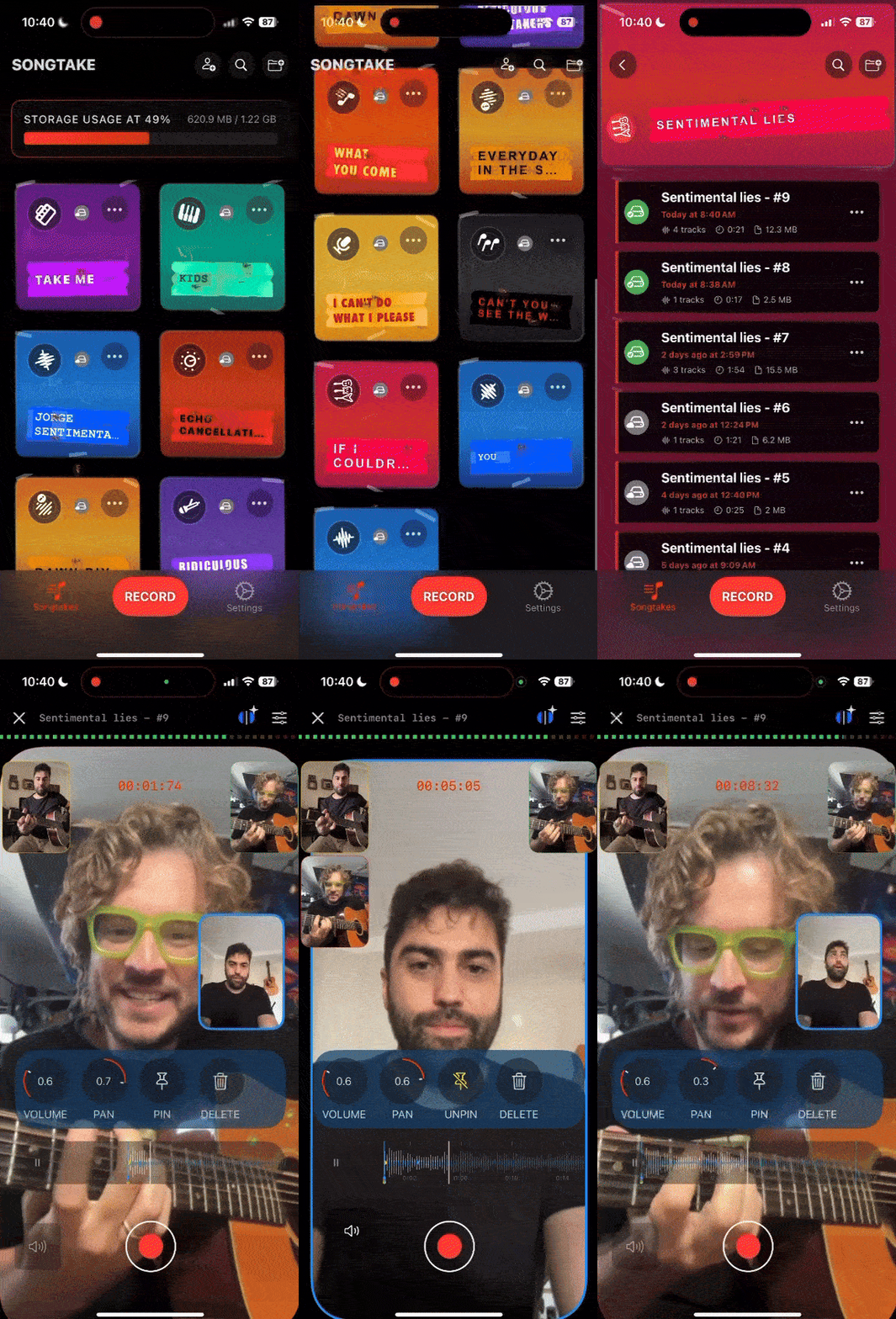
Wskazówka Pro: TIP: There are several ways to incorporate video into iPad music production: film separately and sync in post (time-consuming), use screen recording (limited angles), or use apps like SONGTAKE that record video and audio together automatically synced—no separate filming or manual syncing required.
Często Zadawane Pytania
How do I incorporate video in my iPad music-making workflow?
There are three main approaches: 1) Film video separately and sync manually in post (traditional but time-consuming), 2) Use iPad screen recording to capture your music app interface (limited angles), or 3) Use apps like SONGTAKE that record video and audio together automatically synced—no separate filming or manual syncing required.
Do I need to film video separately and sync in post on iPad?
Not necessarily! While filming separately and syncing in post works, it's time-consuming. You can also use iPad screen recording for simple captures, or apps like SONGTAKE that record video and audio together automatically synced—saving hours of post-production work.
Is there an iPad music app that incorporates video?
Most traditional iPad music apps (GarageBand, Cubasis, BandLab, Auria Pro, n-Track Studio) focus on audio recording and don't include video capabilities. However, apps like SONGTAKE are designed specifically for recording music and video together automatically synced with multi-phone support. Alternatively, you can use screen recording or film separately and sync in post.
Can I capture my iPad music production process with video?
Yes! You can film separately and sync later, use screen recording to capture your app interface, or use apps like SONGTAKE that record video alongside audio automatically. Each method has pros and cons—automatic sync saves the most time.
What's the best way to sync video with iPad music production?
The easiest method is using apps that record video and audio together automatically synced (like SONGTAKE)—no manual work required. Apps like GarageBand, Cubasis, and BandLab are great for music production but require separate video recording. If you film separately, you'll need to sync manually in post using clap markers or timeline editing, which takes time but gives you more control over camera angles.
What other apps are similar to SONGTAKE for iPad music and video?
SONGTAKE is fairly unique in combining multi-phone recording with automatic video/audio sync. For audio-only multi-track recording, apps like GarageBand, Cubasis, BandLab, Auria Pro, and n-Track Studio are popular choices. However, none of these offer the automatic multi-device video sync that SONGTAKE provides. For video recording, apps like Filmic Pro offer multi-camera support but require manual syncing in post.
Czym SONGTAKE różni się od notatek głosowych?
SONGTAKE nagrywa w prawdziwym stereo z automatycznym backupem w chmurze, organizacją projektów i możliwościami wielościeżkowymi. W przeciwieństwie do notatek głosowych, które tworzą cmentarz nienazwanych plików, SONGTAKE utrzymuje wszystko zorganizowane, zsynchronizowane między urządzeniami i gotowe do rozwijania w pełne produkcje.
Czy mogę używać SONGTAKE tylko z jednym telefonem?
Absolutnie! SONGTAKE działa doskonale z jednym telefonem do nagrywania aranżacji, wokali wspierających i warstwowych instrumentów. Podczas gdy wiele telefonów daje wielokątne pokrycie i lepszą izolację, jeden telefon to wszystko, czego potrzebujesz, aby tworzyć profesjonalne nagrania wielościeżkowe z nakładaniem wideo.
Czy mogę używać SONGTAKE do profesjonalnego nagrywania muzyki?
Tak! SONGTAKE płynnie przechodzi od nagrywania mobilnego do profesjonalnej produkcji desktopowej. Zacznij od iPhone dla pomysłów na piosenki, a następnie otwórz ten sam projekt na Macu z profesjonalnym 64-kanałowym interfejsem do miksowania i masteringu. To most między inspiracją a produkcją.
Jak działa nagrywanie wielotelefonowe?
Umieść telefony przy każdym instrumencie jako dedykowane mikrofony. Jedno dotknięcie uruchamia wszystkie telefony jednocześnie, a one automatycznie synchronizują się po nagraniu. Nie jest potrzebne ręczne wyrównanie—po prostu ustaw telefony, naciśnij nagrywanie i uzyskaj profesjonalną izolację wielościeżkową z urządzeń, które już posiadasz.
Gotowy, aby Zacząć?
Pobierz SONGTAKE i zacznij nagrywać muzykę o jakości profesjonalnej już dziś. Karta kredytowa nie jest wymagana.
Stworzone przez muzyków, którzy mieli dość cmentarzy notatek głosowych.